 |
|


|
||||
|
||||
|
How to enable Japanese characters on your PC -
01-04-2008, 08:19 PM
Ok, since recently there have been too many people asking the same question, i decided to write a little guide to help people with this problem.
At this point i can cover only Windows XP, since i haven't got a windows Vista anywhere near me and currently i am not using any Linux systems, but i hope this thread will be updated with the information on all of the most popular Operational systems. Windows XP To enable Japanese characters, you must have your Windows XP CD inserted in your CD-ROM and you must have administrator rights to your PC. Afterwards, it's all peace of cake Go to Start → Control panel 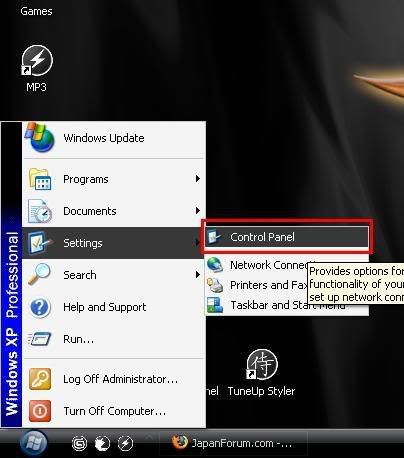 Launch Regional and Language Options Note: if you don't see the icons as in picture below, click on the link on the left side of the control panel window, that says Switch to Classic View 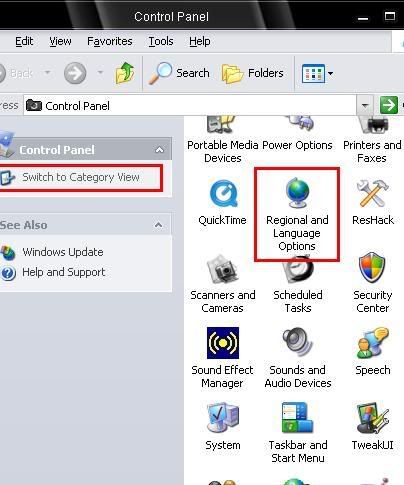 Select the second tab Languages → put a tick on Install files for East Asian Languages → press Apply 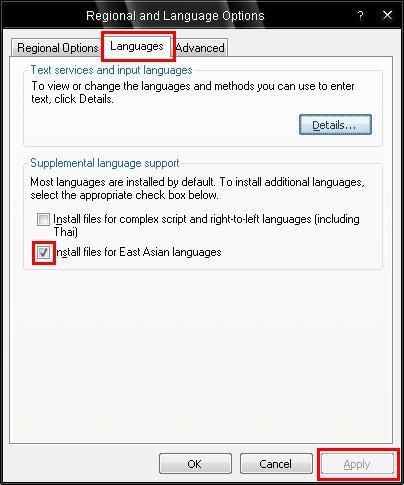 Now all you have to do, is to watch the progress bar fill up and restart your PC Note: In case it asks you for the files after your CD has been inserted, just show the right path to the CD drive. ---------- ALSO there are tutorial videos available. Both in English and German.  
|




|
|
||||
|
||||
|
02-24-2008, 10:52 AM
Quote:
Picture 1: Here you can change language settings Picture 2: There are you options, the first one allows you to set your system language. This means all your menus in your computer. such as the apple menu bar at the top. Picture 3: This is where you can select your language input methods Picture 4: If you wish you can force a program to always open in a particular language. For example I have shown Adium. there is a languages section (where the blue check boxes are) If i wanted to make it open in Simplified Chinese as the application language (not the input but actually menus etc) rather than the default system language, i can deselect all the other languages there and it will always open only in Simplified Chinese no matter what the system language is set to.
|


|
|
||||
|
||||
|
02-24-2008, 01:58 PM
Well, they're already on my compy.
But how to set the keyboard and stuff so I can use it... It's a pain being only able to read and not reply back, especially since I screw up romaji so badly. *Is it ha, or wa? Is it you or yoo? ARGH!!!*
|

|
|
||||
|
||||
|
02-25-2008, 12:09 AM
...I've got nothing. :/
I can't set up the whole computer to have everything in japanese...my family will kill me, since we share it. I'm sorry, I'm computer dumb, but I'm confused. -_-
|
|
|
||||
|
||||
|
02-26-2008, 10:43 PM
What if you use a computer where you don't have administrative rights, like at the library?
hide... always in my heart. I love you.... my pink spider.... My one wish is 2 meet Kyo. seriously. R.I.P. Jasmine....
|

|
|
||||
|
||||
|
02-27-2008, 12:21 AM
thanks that is helpful.
 my family::: big brother: lolitalover older sister: juno brother: auran Crazy Little Sister:lulu older Sister:italianleather The Crazy Maid:kiyuga
|

 |
«
Previous Thread
|
Next Thread
»
| Thread Tools | |


|
|
Copyright 2003-2006 Virtual Japan.

